Showing posts with label Apple. Show all posts

Friday, June 15, 2012

Apple New iPad


Apple New iPad
Models   SRP


New iPad with Wi-Fi 16GB - Black RM1,499


New iPad with Wi-Fi 32GB - Black RM1,799

New iPad with Wi-Fi 64GB - Black RM2,099

New iPad with Wi-Fi 16GB - White RM1,499

New iPad with Wi-Fi 32GB - White RM1,799

New iPad with Wi-Fi 64GB - White RM2,099

New iPad Wi-Fi +4G 16GB - Black RM1,899

New iPad Wi-Fi +4G 32GB - Black RM2,199

New iPad Wi-Fi +4G 64GB - Black RM2,499

New iPad Wi-Fi +4G 16GB - White RM1,899

New iPad Wi-Fi +4G 32GB - White RM2,199

New iPad Wi-Fi +4G 64GB - White RM2,499


Limited stock. Please make your order in advance.

Model

Tuesday, June 12, 2012

15-inch MacBook Pro with Retina display


  • 2.3GHz quad-core Intel Core i7
  • Turbo Boost up to 3.3GHz
  • 8GB 1600MHz memory
  • 256GB flash storage
  • Intel HD Graphics 4000
  • NVIDIA GeForce GT 650M with 1GB of GDDR5 memory
  • Built-in battery (7 hours)
  • Ships: 5-7 business days
  • Free Shipping
  • RM 6,799.00


  • 2.6GHz quad-core Intel Core i7
  • Turbo Boost up to 3.6GHz
  • 8GB 1600MHz memory
  • 512GB flash storage
  • Intel HD Graphics 4000
  • NVIDIA GeForce GT 650M with 1GB of GDDR5 memory
  • Built-in battery (7 hours)

  • Ships: 5-7 business days
  • Free Shipping
  • RM 8,699.00


15-inch MacBook Pro with Retina display

All New Next Generation MacBook Pro with 15″ Retina Display: Specs & Features


The new Next Generation MacBook Pro


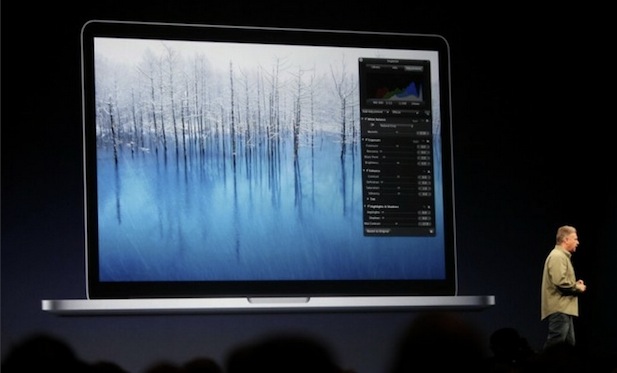
Apple revealed an all new “next generation” MacBook Pro at WWDC 2012 today, it’s the first retina Mac to be made available and comes in addition to their standard MacBook Pro line. The enclosure looks similar to existing unibody MacBook Pro models, though it is significantly thinner and lighter than any previous models.
The specs and features are very impressive and represent some significant engineering, here is what we know so far:
  • 15.4″ Retina Display at 2880×1800, 220 pixels-per-inch density
  • Quad-core i5 and quad-core i7
  • GeForce GT 650M with 1GB VRAM
  • 8GB RAM standard, supports up to 16GB RAM
  • 256GB SSD standard and up
  • 7 hour battery life
  • HDMI port
  • Dual ThunderBolt ports
  • USB 3.0
  • 0.71″ thin
  • 4.46lbs
  • USD $2199 and up
Shipping begins today. We will update with more information as it becomes available from Apple.

Saturday, April 14, 2012

Apple iPhone 4S

SIM Free. You can used with Any Telco.

iPhone 4S

16GB RM2,199 (Black or White)
32GB RM2,499  (Black or White)
64GB RM2,799  (Black or White)


Model

Friday, April 6, 2012

31 Useful Safari Keyboard Shortcuts


Safari icon


Safari is the fast and lean default web browser bundled with Mac OS X. You probably already know a shortcut or two, but there are tons of shortcuts in Safari worth remembering that can really improve your experience browsing the web. We’ll cover 31 different keystrokes, they are grouped into different sections based on use case, and we’ve also included a few multi-touch gestures for those of us with multitouch capable Macs.

8 Shortcuts for Navigating Tabs & Web Pages

  • Switch to Next Tab – Control+Tab
  • Switch to Previous Tab – Control+Shift+Tab
  • Scroll Down by Full Screen – Spacebar
  • Scroll Up by Full Screen – Shift+Spacebar
  • Go to Address Bar – Command+L
  • Open New Tab – Command+T
  • Open Link in New Tab - Command+Click a link
  • Add Linked Page to Reading List – Shift+Click link

7 Shortcuts for Reading & Viewing Pages

  • Strip Styling and View in Reader – Command+Shift+R
  • Increase Text Size – Command+Plus
  • Decrease Text Size – Command+Minus
  • Default Text Size – Command+0
  • Enter or Exit Full Screen – Command+Escape
  • Open Home Page – Command+Shift+H
  • Mail Link to Current Page – Command+Shift+I

5 Shortcuts for Caches, Loading Pages, Source, and Pop Ups

  • Empty Browser Cache – Command+Option+E
  • Reload Page – Command+R
  • Stop Loading Page - Command+.
  • View Page Source – Command+Option+U
  • Disable Pop Up Windows – Command+Shift+K

3 Shortcuts for Finding and Navigating Found Items

  • Find Text on Page – Command+F
  • Navigate Found Items Forward – Return
  • Navigate Found Items Backwards – Shift+Return

8 Shortcuts for Toolbars, History, and Reading List

  • Hide or Show Toolbar – Command+i
  • Hide or Show Bookmarks Bar – Command+Shift+B
  • Hide or Show Status Bar – Command+/
  • Hide or Show Tab Bar – Command+Shift+T
  • Show Top Sites – Command+Option+1
  • Show History – Command+Option+2
  • Show Reading List – Command+Shift+L
  • Show Downloads – Command+Option+L

Bonus: 4 Safari Multi-Touch Gestures

  • Go Back – Two Finger Swipe Left
  • Go Forward – Two Finger Swipe Right
  • Zoom Out / Decrease Font Size – Pinch
  • Zoom In / Increase Font Size – Spread / Reverse Pinch
By William Pearson - Mac OS XTips & Tricks

Sunday, March 18, 2012

Apple iPad 2 New Pricing


IPAD 2
Models Code  New SRP


iPad 2 with Wi-Fi 16GB - Black MC769ZP/A RM1,199

iPad 2 with Wi-Fi 32GB - Black MC770ZP/A RM1,499

iPad 2 with Wi-Fi 64GB - Black MC916ZP/A RM1,799

iPad 2 with Wi-Fi 16GB - White MC979ZP/A RM1,199


iPad 2 with Wi-Fi 32GB - White MC980ZP/A RM1,499


iPad 2 with Wi-Fi 64GB - White MC981ZP/A RM1,799


iPad 2 Wi-Fi +3G 16GB - Black MC773ZP/A RM1,599


iPad 2 Wi-Fi +3G 32GB - Black MC774ZP/A RM1,899


iPad 2 Wi-Fi +3G 64GB - Black MC775ZP/A RM2,199


iPad 2 Wi-Fi +3G 16GB - White MC982ZP/A RM1,599


iPad 2 Wi-Fi +3G 32GB - White MC983ZP/A RM1,899


iPad 2 Wi-Fi +3G 64GB - White MC984ZP/A RM2,199


Model

For further information, 

Please contact our Authorized Sales Agent

Thursday, March 8, 2012

The New iPad


Pick up the new iPad and suddenly, it’s clear. You’re actually touching your photos, reading a book, playing the piano. Nothing comes between you and what you love. To make that hands-on experience even better, we made the fundamental elements of iPad better — the display, the camera, the wireless connection. All of which makes the new, third-generation iPad capable of so much more than you ever imagined.

Monday, February 6, 2012

Apple MacBook Air 11" 128GB


11-inch : 128GB

  • 1.6GHz dual-core Intel Core i5
    processor
  • 4GB memory
  • 128GB flash storage
  • Intel HD Graphics 3000
  • Price: RM 3,699.00

Kuala Lumpur
Mobile 017-6811 383
iMessage: rnrishop@gmail.com

Penang
Mobile: 013-584-4212
email: shaky.rnr@gmail.com


Sunday, February 5, 2012

Apple MacBook Air 11" 64GB


11-inch : 64GB

  • 1.6GHz dual-core Intel Core i5
    processor
  • 2GB memory
  • 64GB flash storage
  • Intel HD Graphics 3000
  • Price: RM 3,099.00


Kuala Lumpur
Mobile 017-6811 383
iMessage: rnrishop@gmail.com
email: rnrishop@gmail.com


Penang
Mobile: 013-584-4212